Style and sync your MT5 charts.
STYLE one look for all your charts · SYNC charts that move together
SX Chart Tools is one indicator with two jobs, run from a small panel on the chart. Give every chart the look you want with one click, and link charts into groups that change symbol, scroll and share drawings together.
Free demo on the MQL5 Market. STYLE works in the Strategy Tester; SYNC needs two live charts.
See it on real charts.
Looks applied to several charts at once, a linked group with shared drawings, and the shaded higher-timeframe candle.
One look. Every chart.
A look stores everything you see on a chart: all the colours, what is shown (grid, volumes, period separators, OHLC, scales, trade levels) and, if you want, the zoom. Apply it to one chart or all of them with one click.
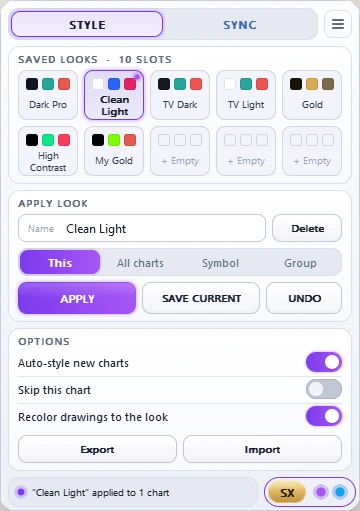
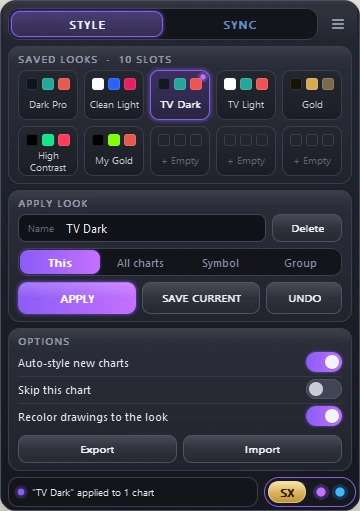
10 slots, 6 ready to use
Dark Pro, Clean Light, TV Dark, TV Light, Gold and High Contrast, plus four free slots for your own looks.
This chart, all charts, a symbol or a group
Choose where the look goes and click Apply. Undo takes back the last Apply on every chart it changed.
Saved in 30 seconds
Set up a chart the way you like it (F8), pick a free slot and click Save current. Rename it or delete it on the panel.
New charts follow
New charts get the look in use automatically. Skip single charts, recolour your drawings to the look, and export or import all looks to use them in another terminal.
Charts that move together.
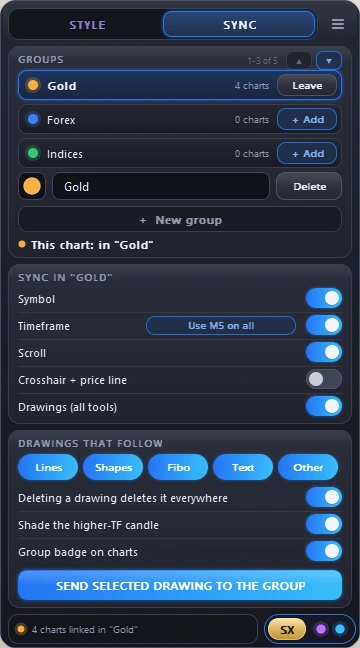
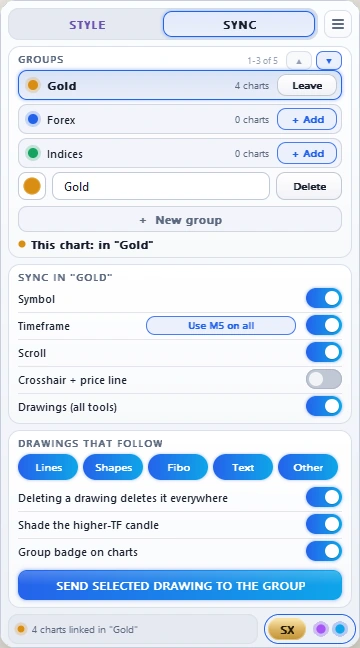
Link charts into a group, up to six groups at the same time. Each group has its own colour and name, and you choose what it follows.
Change it once
Switch the symbol on one chart and the whole group follows. Each chart keeps its own timeframe.
Optional
Change the timeframe on one chart and the group follows. If the charts differ, one click puts them all on the same one.
Same time on every chart
Scroll back on one chart and the others go to the same time. Press End to bring them all back.
A line at the same time and price
The other charts show a vertical line at the same time, and charts of the same symbol a horizontal line at the same price.
Every drawing tool
A drawing appears on the group's charts with the same symbol, also on other timeframes. Move or change it and it changes everywhere. You choose which kinds follow.
See where you are inside the bigger candle
Point at a candle on the higher timeframe, and the lower-timeframe charts shade the candles inside it.
Three ways to use it.
Common layouts and the switches they need.
One instrument on 4 timeframes
Gold on M5, M15, H1 and H4. Draw a level once and it is on every chart.
4 instruments on one timeframe
Four pairs side by side. Change the timeframe once for all four.
Two groups at once
Gold on 4 timeframes in one group, 4 forex pairs in another, each with its own colour.
Built-in safety
- Loading a template or deleting many drawings at once is not passed on to the group.
- If a chart with another symbol joins a group that follows the symbol, the panel warns you.
- A 24/7 chart like BTC does not jump back to Friday because a forex chart in the group is closed.
Trying the demo
The demo runs in the Strategy Tester, where MetaTrader opens only one chart. There you can try the looks on the STYLE tab, save your own and use Undo. SYNC needs at least two real charts, so the video above shows it in action.
Every button, explained.
The full guide on the MQL5 blog: getting started, STYLE, SYNC, the inputs and the most common questions.
Questions and answers.
Something missing? Write to support@sizerx.app.
Do I need it on every chart?
For STYLE one copy is enough: it can style all your open charts. For SYNC, put a copy on every chart you want to link.
My drawings are gone.
Check the object list (Ctrl+B), they are usually still there. If Scroll is on, the chart may be scrolled back in time: press End.
A drawing does not appear on another chart.
Drawings go to charts in the same group with the same symbol, and only the kinds switched on under "Drawings that follow".
A chart changed its symbol by itself.
Its group has Symbol on: a symbol change on any chart of the group moves them all.
It feels slow with many charts.
Switch off what you do not need in the group, for example the crosshair.
Does it trade or change my orders?
No. SX Chart Tools is an indicator. It changes how your charts look and move, never your trades.
Set it up once.
Every chart follows.
Free demo, buy or rent on the MQL5 Market.